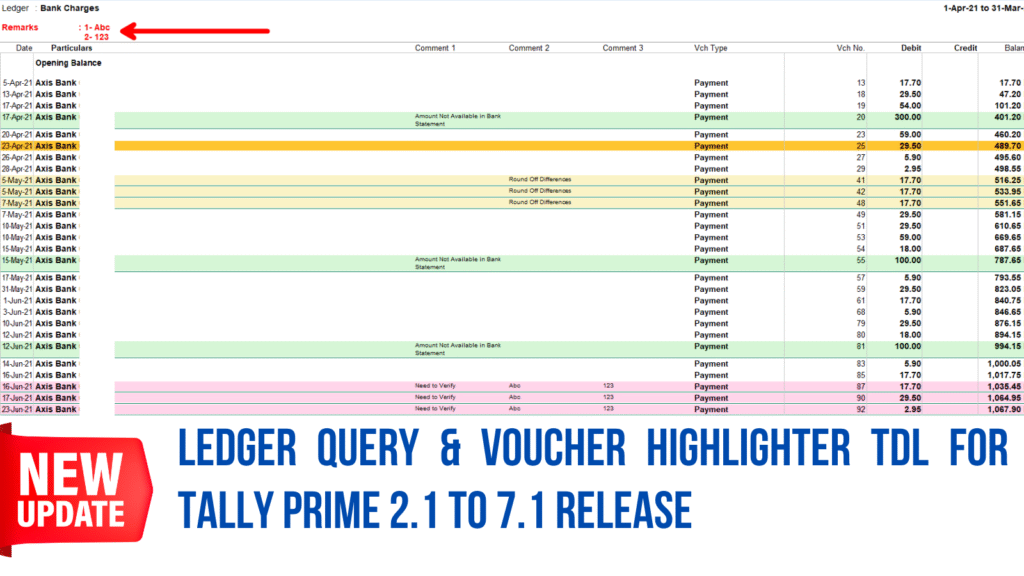
The Ledger & Voucher Highlighter TDL helps CAs, auditors, and accountants review data and track client queries directly inside Tally Prime. It allows you to assign audit statuses (Verified, Mismatch, Partial Match, Pending) across ledgers and groups, update status notes in bulk using the spacebar, and color-code specific voucher lines with custom comments. All audit notes stay isolated per financial year so past records never get overwritten, while an internal query box and Gateway Ledger Query Report make it easy to filter and print clear query sheets for clients or staff.
5.0 Rating ★★★★★
100+ Professional Purchased
TDL Description
This TDL helps CAs, accountants, and audit teams mark ledgers and vouchers directly inside Tally Prime.
🔑 Key Features
What does this TDL do? This TDL allows you to highlight ledgers, color-code specific voucher entries, add audit notes, and print query reports directly inside Tally Prime.
Main Features:
1. Ledger & Group Marking
Add audit status (Verified, Mismatch, Partial Match, Pending) and notes to any ledger or group in Profit & Loss, Balance Sheet, or Daybook.
Automatic color coding based on status (such as Green for Verified, Orange/Pink for Mismatch).
Select multiple ledgers at once using the Spacebar and update status and notes in bulk.
Turn status visibility on or off anytime using the “Show Audit Status” button.
Audit notes stay separate for each financial year (Alt + F2), keeping past years’ data safe.
2. Voucher Highlighting & Notes
Highlight individual transaction entries inside any ledger using background colors.
Add up to 3 lines of comments on specific voucher entries.
Print color-highlighted ledger statements with comments (works best in Landscape mode via F12 settings).
3. Ledger Query Box & Gateway Report
Write multi-line internal audit queries (press Ctrl+Enter for a new line) directly inside ledgers.
Internal queries stay inside Tally and will not print on customer invoices or bills.
Access a dedicated Ledger Query Report right from the main Gateway of Tally menu.
Filter the query report by specific groups (like Fixed Assets or Expenses) and print 1-click query sheets for clients or staff
.
How to Set Up:
Copy the TDL file path.
In Tally Prime, go to F1: Help > TDLs & Add-ons > Manage Local TDL, set Load Selected TDL Files on Startup to Yes, and paste the path.
Go to F6: Add-on Features, set Mark Voucher in Daybook/Register to Yes (All Field view), and set Enable Audit Status to Yes.
This TDL makes consolidated reporting cleaner, faster, and smarter.
💻 Compatibility
100% Compatible with all versions of Tally Prime
May work in Tally.ERP 9 (but no support provided)
TDL Benefits
✅ See the exact audit status of every account at a glance without maintaining separate spreadsheets ✅ Saves review time by eliminating the need to edit ledgers one by one ✅ Select multiple ledgers at once using the Spacebar and update their audit status and remarks in a single action ✅ Tag any ledger or group in the Profit & Loss, Balance Sheet, or Daybook with audit statuses (Verified, Mismatch, Partial Match, Pending) and custom remarks ✅ Links audit statuses, remarks, and color highlights specifically to selected accounting periods (Alt + F2) ✅ Highlight specific transaction lines inside ledger statements with custom background colors and attach up to 3 lines of comments ✅ Print ledger statements complete with background colors and multi-line voucher comments in Landscape view ✅ Write multi-line internal audit notes directly inside individual ledger screens using Ctrl + Enter ✅ Saves Time & Reduces Errors ✅ Very useful for CAs & Businesses ✅ Multi-user Support available ✅ Single TDL for all Versions of Tally Prime
TDL Includes
✅ Free Video Training ✅ Free Support on Google Meet / Anydesk ✅ Free Chat Support ✅ Multiuser License support ✅ Free Webinar Access for this product ✅ One-time configuration provides a permanent, lifelong automation tool for your business operations
FAQ of Ledger Query & Voucher Highlighter TDL TDL
Which Tally versions are compatible with this TDL?
The TDL is universally compatible with all versions from Tally Prime 2.1 to Tally Prime 7.1
Can we use this TDL in Tally Erp 9 ?
No, this TDL may work on Tally.Erp9 but we don't provide support for Erp9
Is there any limit on number of company in tally to use this TDL?
No, it can be used for unlimited companies in your Tally License
How do I enable the automation features?
Navigate to the F6 configuration menu and enable the features as shown in video
Can I update audit statuses for multiple ledgers at once?
Yes, select multiple ledgers using the Spacebar and click Bulk Update Remarks to update them all at once.
Will audit notes get mixed up when changing financial years?
No, all statuses, remarks, and highlights are separated period-wise by financial year (Alt + F2).
How do I highlight individual voucher entries inside a ledger?
Select the entry, click Mark/Unmark, pick a background color, and add up to 3 lines of comments.
Will internal audit notes print on customer sales invoices?
No, internal queries and comments stay strictly inside Tally Prime and will never appear on sales bills.
Can I print ledger statements with colors and notes?
Yes, turn on color and comment printing in F12 settings (Landscape mode is recommended).
Can I hide audit colors and statuses while working?
Yes, use the Show Audit Status button in report screens to toggle visibility on or off anytime.
Can I filter the Ledger Query Report for specific groups?
Yes, you can filter queries by groups like Fixed Assets or Expenses and print 1-click query sheets.
 Auto Email Module with Scheduler Options for Tally Prime - 1 Year